

How one RTX 5090 now checks three videos at once
OriginAI runs on one rented graphics card. We measured how much of that card a single scan actually uses, first on an RTX 3090 and then on an RTX 5090, and changed the worker so that three people can scan at the same time. This post covers the tests, the changes, and the results.

Every scan on OriginAI runs on a single GPU that we rent by the hour. Until this month, that GPU checked one video at a time, so if two people pressed Scan together, the second person had to wait for the first scan to finish. We wanted to know whether the card could handle more, and how much more.
We tested this in three rounds: on the RTX 3090 the site used at the time, on an RTX 5090 with the same software, and on the RTX 5090 again after rewriting parts of the worker.
How we measured
We rented the same kind of machine the site uses from Vast.ai and ran the worker exactly as it is deployed. Every test used the example clip from our homepage, re-encoded to 1080p in three versions:
- 15 seconds long (451 frames)
- 2 minutes at 30 frames per second (3,600 frames)
- 2 minutes at 60 frames per second (7,200 frames), the heaviest video the site accepts
Each video was checked with all four detectors: Veni HQ, Veni LQ, Vidi, and Vici. We sent a mixed batch of scans at once (16 in the first two rounds, 24 in the third) and let the worker run a fixed number of them at the same time. A separate test sent only the heaviest videos together. For every run we recorded scans per minute, the wait per scan, how busy the GPU was, its peak memory, and the number of failed scans.
Round 1: RTX 3090 with 24 GB
A single scan did not keep the RTX 3090 busy. While one video was being checked, the GPU was working only 42 to 66 percent of the time. The rest of the time it waited for frames to be decoded, for the face to be tracked from frame to frame, and for small steps that depend on each other. That suggested there was room for a second scan.
Memory turned out to be the limit. The worker at the time kept a preview of every decoded frame on the GPU, so longer videos needed much more memory. On top of the 3.1 GB that the loaded models take up, one scan needed:
| Video | Veni and Vici | Vidi |
|---|---|---|
| 15 seconds | 8.3 GB | 2.8 GB |
| 2 minutes at 30 fps | 10.4 GB | 4.9 GB |
| 2 minutes at 60 fps | 13.2 GB | 7.7 GB |
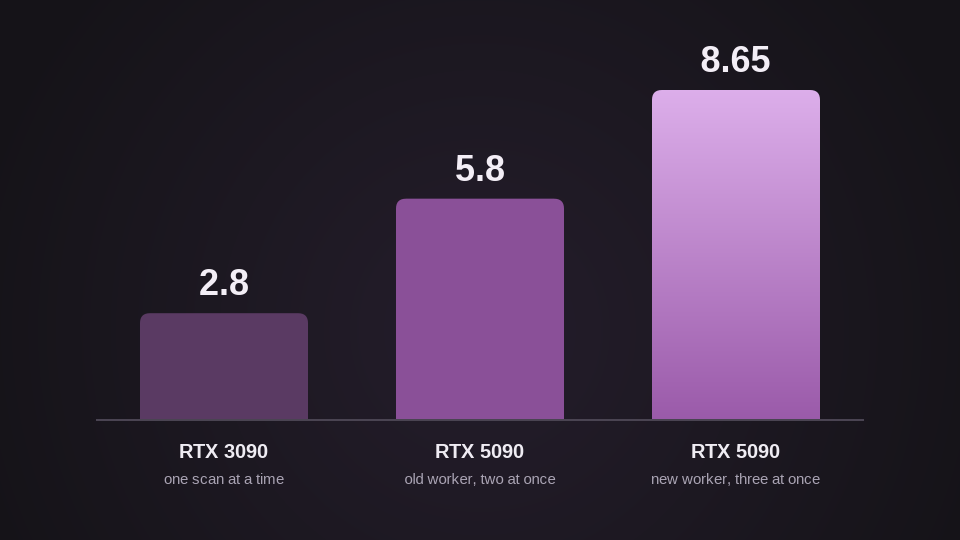
Checking one video at a time gave 2.8 scans per minute. With two at once and PyTorch's default memory settings, the card ran out of memory and only 4 of the 16 scans finished. After switching PyTorch to expandable memory segments, which reduce fragmentation, all 16 finished at 3.54 per minute, 26 percent more, with the GPU 83 percent busy and 23.5 of its 24 GB in use. Two of the heaviest videos together still ran out of memory, so the 3090 stayed at one scan at a time.
Round 2: RTX 5090 with 32 GB, same worker
The RTX 5090 was 1.3 to 1.5 times faster per scan. A 2-minute 30 fps video took about 21 seconds with Veni instead of 27, and Vidi's heaviest test took 85 seconds instead of 130. A single scan kept it busy only 30 to 41 percent of the time, even less than on the 3090, because the work done on the CPU now set the pace.
With the same worker, one scan at a time gave 3.9 scans per minute. Two at once gave 5.8, all 16 scans finished, and two of the heaviest videos together peaked at 29.4 GB. Three at once ran out of memory: 5 of the 16 scans failed, and all three heavy videos failed. The 5090 was fast enough for more scans, but it did not have the memory for them.
Scans per minute before the changes
16 mixed scans, 1080p, all four detectors
What we changed
Instead of renting a second GPU, we reduced the memory each scan needs and changed how scans share the card:
- Each scan runs on its own CUDA stream, so the many small GPU steps of one scan, such as face detection and alignment, can run while other scans are busy on the CPU. The detector models themselves run on one shared stream, one scan at a time, because PyTorch keeps freed memory reserved per stream and three separate streams would each hold several gigabytes.
- Frame previews, which are used for the evidence maps, are kept in system RAM. Only the roughly 40 frames that appear in a result are copied to the GPU.
- For Vidi, the face crops are cut while the video is read the first time instead of decoding it twice, and the facial landmark model processes faces in full batches of 16.
- Expandable memory segments stay on. If a scan still runs out of GPU memory, it is run again on its own, at the front of the line, instead of failing.
- Videos are decoded on the CPU. During testing we found that the GPU decoder had been falling back to a conversion path whose pixels differed from the thesis pipeline by up to 2 out of 255. The CPU decoder produces exactly the same frames as the thesis code, and it also removed a crash the GPU decoder caused when several streams were busy.
- A fixed cuBLAS workspace keeps the calculations reproducible when several streams run together.
Some ideas did not make it: a faster face-detection image pyramid, because its output was not identical on real video frames; running all scans on one shared stream, which was slower and crashed; and changing Python's thread-switching interval, which made no measurable difference.
The version running now is our third attempt. The first one lowered memory use and almost doubled throughput at two scans, but three at once was no faster than two. The second added a stream per scan but still decoded video on the GPU, and under load the decoder crashed and took the other scans down with it. The third moved decoding to the CPU.
Round 3: RTX 5090 with the new worker
We tested the new worker on an RTX 5090 with 12 CPU cores, the configuration the site rents, using 24 mixed scans.
Scans per minute after the changes
RTX 5090, 12 CPU cores, 24 mixed scans
Peak GPU memory
Same runs, in GB; a full bar is the RTX 5090's 32 GB
Heaviest videos: 2 minutes at 60 fps
Scans per minute with several sent at once, RTX 5090
Vidi: time to check one 2-minute video
Seconds, one scan on its own, RTX 5090
The full results:
| Measure | Old worker | 1 at a time | 2 at once | 3 at once | 4 at once |
|---|---|---|---|---|---|
| Scans per minute | 3.75 | 4.41 | 7.4 | 8.65 | 7.95 |
| Average wait per scan (s) | 31.7 | 27.1 | 24.0 | 25.5 | 32.9 |
| GPU busy (%) | 35 | 39 | 62 | 70 | 64 |
| Peak GPU memory (GB) | 16.2 | 13.8 | 19.9 | 23.9 | 28.4 |
| Failed scans | 0 | 0 | 0 | 0 | 0 |
Three scans at once gave the highest throughput: 8.65 scans per minute, 2.3 times the old worker, with the GPU busy 70 percent of the time and a peak of 23.9 of its 32 GB. Four at once was slower, at 7.95 per minute, and each scan waited longer, because decoding on 12 CPU cores became the bottleneck. No scan failed in any run of the new worker, including a test with 16 of the heaviest videos. Vidi also got faster on its own: a 2-minute video went from 48 to 29 seconds, because the video is now read once and the landmark model works in full batches.
The worker now chooses how many scans to run at once based on the hardware it finds: three on an RTX 5090 with at least 12 CPU cores, two on a 24 GB card, and one on a 16 GB card.
Do the results change?
Running scans together does not change the results. With the same video decoder, Veni HQ, Veni LQ, and Vici give bit-identical scores, timelines, and evidence images whether one or four scans run at once. Vidi varies in the fourth decimal place between runs, as it did before.
The switch to CPU decoding did move some scores slightly. On one test clip, Veni LQ went from 0.163 to 0.182. This is because the frames now match the thesis pipeline exactly, so the site's scores are the ones the thesis method produces.
What this means for you
- Up to three people can scan at the same time. A fourth person waits in a short line on the scanner page, and their scan starts automatically when a spot opens up.
- One GPU handles about 8 to 9 scans per minute, or around 500 per hour, at a cost of about 50 cents an hour.
- Long videos finish sooner. A 2-minute video checked with Vidi takes about 29 seconds instead of 48.
All measurements were taken on October 9, 2026, on rented machines: an RTX 3090 with an AMD EPYC 7K62 (23 CPU cores available) and an RTX 5090 with an AMD EPYC 7R12 (23 cores in round 2, 12 cores in round 3). Scans per minute is the number of completed scans divided by the time until the last one finished. GPU busy is the average utilization reported by the NVIDIA driver during a run. Rounds 1 and 2 used 16 scans and round 3 used 24, so the numbers from different rounds are not exactly comparable. Results on other machines may differ by a few percent.